
The hoops I had jumped over by this time:
- Eye test – easy (done by customer service)
- Basic Theory Test – best news ever (no need to take! apparently if you have passed it before and I did back in 2011, you don’t ever need to retake it)
- Final Theory lessons x 2 – compulsory. Easy to do, just need to attend but it’s quite long
- Final Theory Test – Through the super useful article on Reddit (which has been taken down already), I found this app called TP Test which has many past FTT questions. I also did e-Trials on CDC website. They give 4 free trials and then subsequent ones are at $7+ for 50 mins. Just make sure you can set aside 50 minutes to do as many trial tests as possible. Once 50 minutes are up, you will need to pay another $7+ to do more e-trial tests. I also found that having practical lessons while preparing for FTT was very helpful as it helped with the understanding. I passed my FTT with 98% passing score (Praise God) and at least one question was something I learnt during the practical lessons.
- I have done three compulsory Simulation modules. Only after completing three modules can a learner book practical test. I booked the simulations on three separate days but it would be smarter to book multiple modules on the same day to save three trips.
- I have done 10 practical lessons by now and had 9 different driving instructors and not a single lesson was with the One Team I paid a premium for. I would ask every instructor how can I get my own Team’s instructor and no one really has the answer. One instructor asked me how I booked lessons on the app and it was through his advice that I discovered how to find my own team on the CDC app.
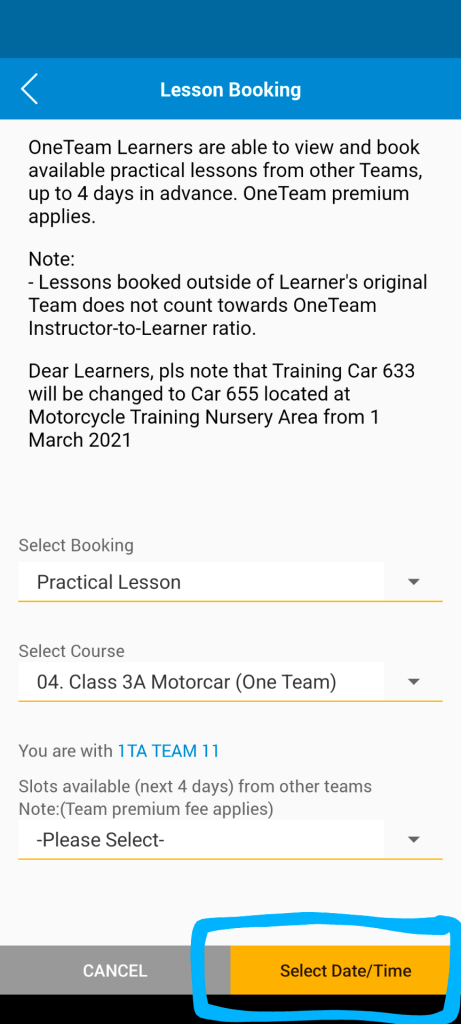

CDC also has super poor customer service support for learners who cannot book with their One Team instructors. I could not find a way to write in to request for help. One instructor told me that CDC has a Students Affairs department which looks into such problems. After realising that I have been trying to find Team 11 in the wrong way, I was reminded (by the Holy Spirit I believe!) that the counter staff had told me that every day new slots are released for One Teams at 9am everyday. So this morning at 9.12am, I actually saw MANY available slots from Team 11 in April. HALLELUJAH!
In summary:
- Just click on the yellow “Select Date/Time” button if you signed up for One Team.
- Go onto the app at 9am everyday to check for available slots
 My Life At 50